


'/%3E%3C/svg%3E)

⚠️ Why Traditional Spreadsheets Reach Their Limits
In the beginning, spreadsheets are a useful tool. However, once organizations reach around 50 to 100 assets, maintaining visibility becomes increasingly difficult:
- ❌ Endless scrolling
- ❌ Unclear column structures
- ❌ No targeted filtering
- ❌ High time investment for simple tasks
Real-World Example:
After the weekend, an administrator checks the backup status of multiple sites manually, asset by asset. What once took seconds now takes minutes.
👉 The problem is rarely missing information. It is usually the inability to access it quickly.
🔍 The Challenge Behind the Complexity
Many systems are technically powerful, but difficult to use efficiently in day-to-day operations.
Typical Challenges:
- Rigid tables with limited customization options
- Lack of search capabilities across systems and locations
- No personalized view of relevant information
The result: Information exists, but it is not available quickly enough when it is needed.
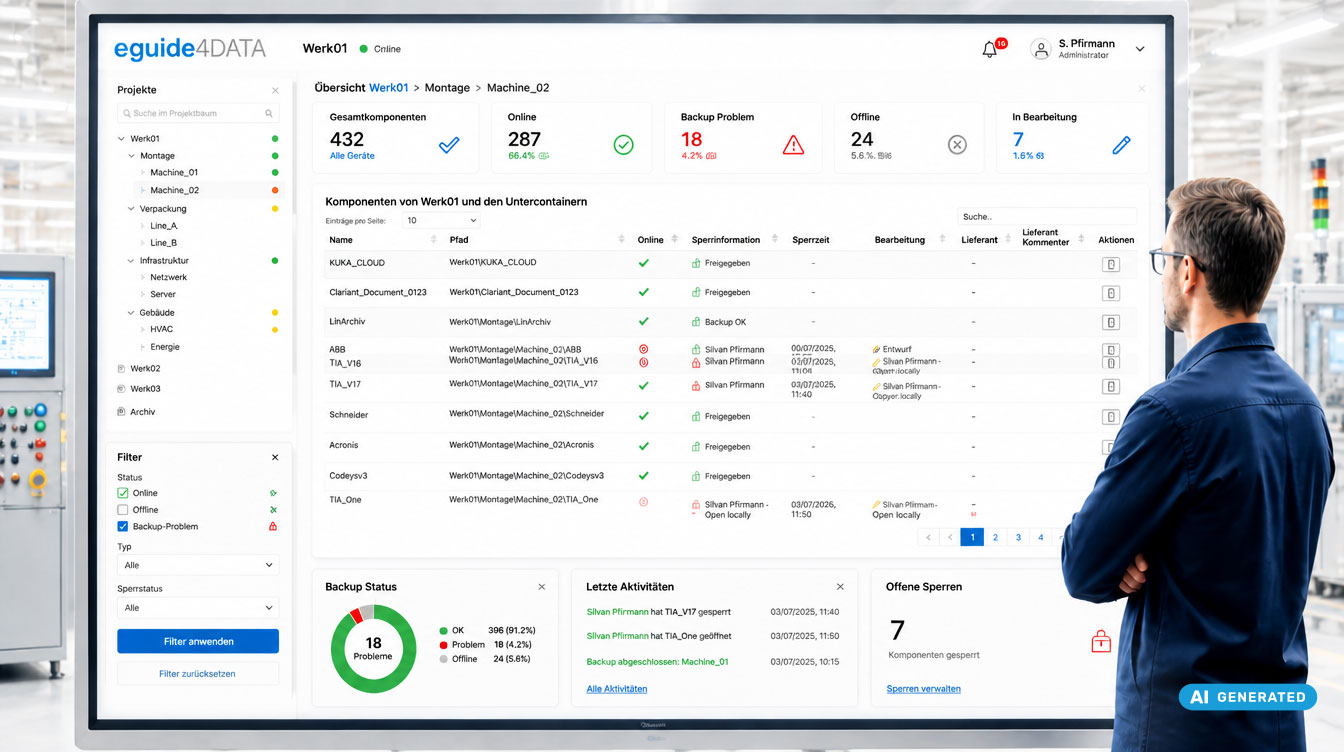
✅ How eguide4DATA Helps
🔍 Search Instead of Navigation
A centralized project tree enables direct searches across all levels of your OT environment.
Benefits:
- Instant access to relevant components
- No manual clicking through multiple levels
- Faster navigation within large structures
⚙️ Flexible Table Views
Views can be configured to match individual requirements:
- Show or hide columns
- Apply filters to individual columns
- Sort by component type
- Display all entries on a single page
Benefits:
- Focus on the information that matters most
- Significantly reduced visual clutter
📊 Key Status Information at a Glance
Important operational information is available without additional clicks:
- Backup status
- Log status
- Processing status including timestamps
Benefits:
- Faster assessment of current conditions
- Better-informed decisions without unnecessary navigation
⏱️ Real-World Example: Saving Time Every Day
An administrator manages 280 assets.
Before:
- Manual verification
- Several minutes of effort
With eguide4DATA:
- Apply a “Backup Error” filter
- Instantly identify affected assets
✅ Result: Full visibility in less than 30 seconds
🎯 Why This Matters
- As the number of assets grows, complexity increases exponentially
- Efficient navigation becomes a critical success factor
- Systems must make information instantly accessible
- Structured access replaces manual searching
✅ Conclusion
The way information is accessed has a direct impact on everyday operational efficiency.
eguide4DATA keeps large OT environments organized and transparent by providing a clear structure, instant access to relevant information, and efficient navigation without adding unnecessary complexity.
🚀 Experience OT Component Management in Action
See in a personalized demo how you can maintain full visibility across hundreds or even thousands of OT components. Discover how eguide4DATA combines intelligent search, flexible filtering, status information, and customized views to make critical information available in seconds instead of minutes.
FAQ: About OT Component Management with eguide4DATA
Are table views customizable?
Yes. Views can be tailored using flexible filtering and column configuration options.
How many components can be managed?
Several thousand. eguide4DATA is designed for industrial-scale environments and high scalability.
What does the editing flag indicate?
It shows which project is currently being edited by a colleague.
Does the search function work across all levels?
Yes. Search capabilities extend across all levels, even within complex structures.
Can I display all entries at the same time?
Yes. Pagination limits can be removed, allowing all entries to be displayed on a single page.